

What is a Guild Project?
A Guild Project is a task where we work together to produce a certain number of the required item(s) in an allocated time frame.
As the Guild levels up we gain additional projects choices, and as we repeat each project we gain harder versions of it.
The harder the project is to complete, the more we earn for completing it.
Everyone who participates in a project earns Loyalty Points for doing so.
Each completed project helps the Guild level up.
And each completed project also earns points for the Guild which can be used
to increase the number of members the Guild can have,
to increase how many 'helps' each member can fill each day,
or to increase rewards for giving help or for taking part in Guild Projects.
How do I take part?
There are two ways to take part, and you earn rewards whether you do one or both.
The first simply entails watching an advert, which gives a 1% contribution to the requirement.
Each item in a project will have an advert until that item is completed.
Watching the advert isn't considered as fulfilling participation requirements during a Guild Tournament
(see the Guild Tournament Participation Requirements page)
The second is to produce / collect the item(s) required for the project.
Not all members will be able to produce all items, which is only an issue during Guild Tournaments
(see the Guild Tournament Participation Requirements page)
How do I know a project is running?
There is a setting in the game that can be used to send you a notification whenever a project is started.
Alternatively, just look for an icon on your game screen.
This will appear at the bottom of your screen towards the right hand corner, and will have an image linked to the project in progress.
In the example below, the project that is active requires members to collect milk from the cow sheds.

How do I see the project details?
Clicking on that project icon will show you
what needs to be collected,
how many of each item this project requires,
how many of each have already been collected,
how long is left to complete the project,
and also give you the link(s) to watch the advert(s).
This button turns grey once you've watched an advert
Please note : Only the Guild Admin team will see the red 'cancel' icon at the bottom of the project details box.

Can I see who has contributed?
Yes.
You will see a button labelled 'Overview'.
Clicking on that will display a list of members who have contributed so far, and how many items they've contributed.
When a project requires more than one item, it only shows their total contribution. It's not broken down by item.
It also doesn't show whether or not a member has watched the advert(s),
but if they have then their contribution for that is also included in their total contribution figure.

Can I donate items from my barn?
No.
All contributions to the project have to be collected whilst the project is running.

When do I get my reward?
As soon as the project is completed you will receive a message with a link to collect your reward
This message arrives in the mail box up by your profile picture
Click on the mailbox, and then on the message you received
This will be labelled as 'Project Completed', followed by the project name
eg. Project Completed: Get Milk!
Once opened, you will see
details of when the project was completed
how long it took to complete the project
a list of participants with their contribution and reward
and at the bottom of the message is a green button labelled 'claim'
click on this button and your reward will be credited to your loyalty point balance
I have noticed that there are sometimes different reward levels for different members in a single project
as there are in the example below, but haven't yet managed to work out why !!


Can I see a list of all available projects?
Yes
The first way is probably the easiest if there is an active project,
Under the details of the active project you will see a lot of pictures
Each of these relates to a project, and if you click on a picture it shows you the details of that one.
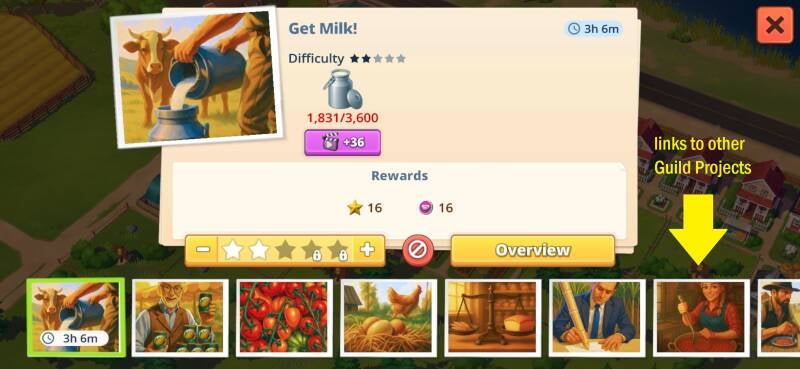
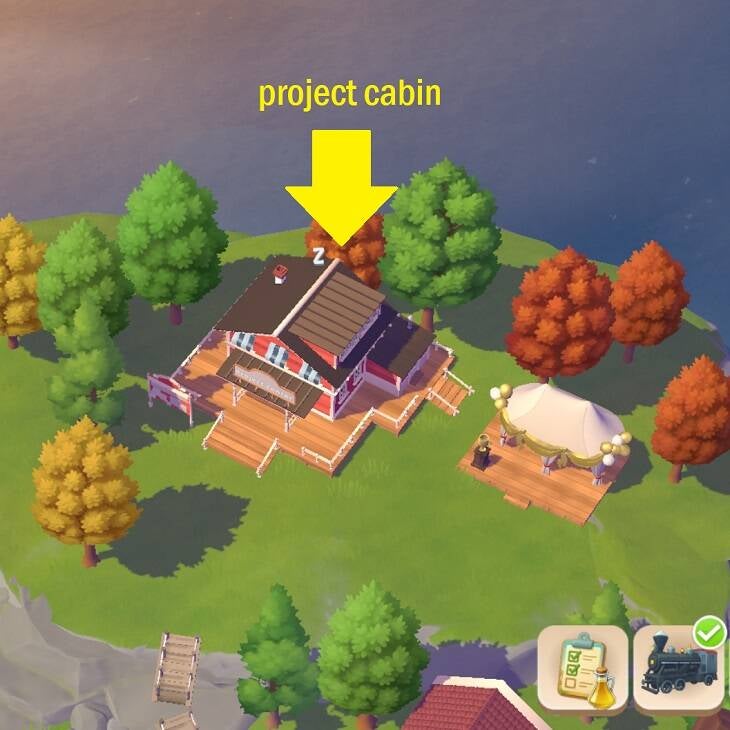
The second method is the only way if there's no active project
Click on the map icon in the bottom right corner of your screen
Now click on the Guild icon
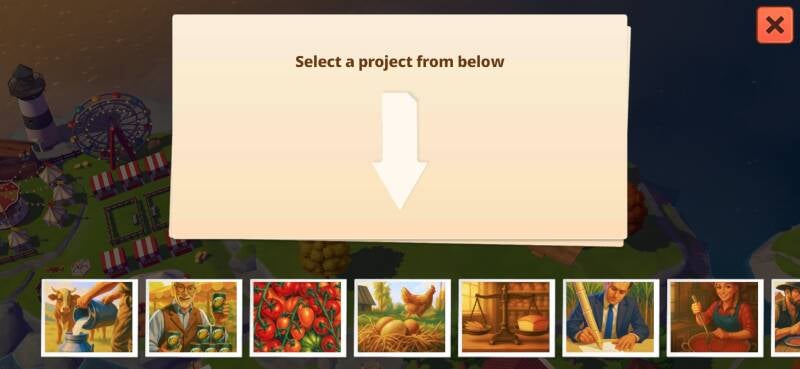
Then locate the Project Cabin - when there's no active project it has ZZZ's coming from it
Click on the Project Cabin
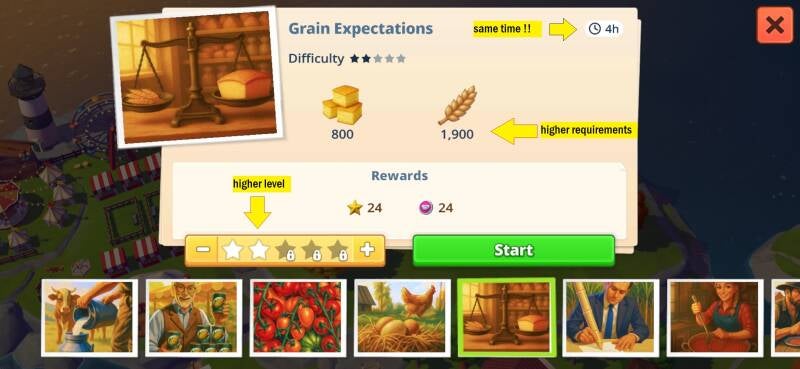
You now have an empty details box, with all the small project icons under it
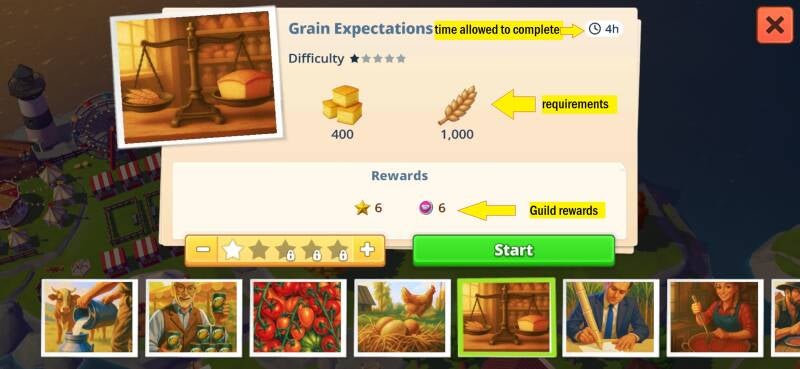
Click on one of the icons and it will show you the details of that project
You can click on the stars to see the requirements for higher levels,
even those with padlocks that we can't yet select
Everyone will see the Start button in green for those we CAN do,
but it won't work for anyone who isn't part of the Admin team.


Why aren't my points always a match to what I contributed?
For the early projects the points system was simple
Watch an advert that counts as 3 items - you earn 3 points
Harvest 100 of an item that requires at least 100 - you earn 100 points
Harvest 100 of an item that only requires 62 to complete - you earn 62 points
Working out who had only watched adverts was easy
And then we did a Carrot Cake Crush project which required a total of 500 items
But between participants we earned 900 points ?
And followed it up with a Prank Salad requiring 1500 items
And the total points handed out was 2500 !!
The next time these ran I watched what points were given for each action done on the projects
Contributing (or watching an advert) for Carrots gives contribution x 3 as points
Contributing (or watching an advert) for Sugar gives contribution x 2 as points
Contributing (or watching an advert) for Potatoes gives contribution x 2 as points
Contributing (or watching an advert) for Hot Peppers gives contribution x 2 as points
As new projects open I shall monitor (and record) the contribution to points details if more than 1:1
Makes watching for advert only participation during Guild Tournaments a little more tricky
as I need to remember these 'specials'
Create Your Own Website With Webador